

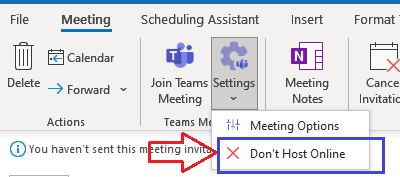
Following on from this post:Office 365 Migrations - What happens to Outlook Meetings with embedded Teams URLs? - Nero BlancoWe developed a tool to strip out Teams info from Calendar invites, so that new Teams info co...
Most popular posts:

Uninstall Microsoft Teams cleanly
Teams Cache CleanerTry this one last time...Start PowerShell as Admin and run:Set-ExecutionPolicy -ExecutionPolicy RemoteSigned -Scope Processtaskkill /IM teams.exe /F /TGet-ChildItem -Path ([System.Environment]:...
Where do emails sent to the default Microsoft Teams email address go?
Where does the default Teams email go?When you first create a Microsoft Team it allocates an email address for the Team. That email address is built by the Display Name (with spaces and special characters remove...
Microsoft Office 365 Security Health Check
A simple traffic light report, produced by one of our Office 365 Consultants, looking into your configuration to highlight if there are any areas of concern and to give you an increase comfort level that you have a good security posture
Hmmm…can’t find that team
We’re seeing renewed issues with Microsoft Live ID or Microsoft Personal accounts interfering with new corporate identities when an organisation starts is Microsoft Cloud/Teams journey. Users cannot access resources (documents/Teams) which they have been given permission, or join Microsoft Teams due to security restrictions, like conditional access or guest account settings. Conrad provided an excellent […]
Troubleshooting Microsoft Teams Logon
This is a bit of a sledgehammer to crack a nut scenario to get you back up and running on teams. Where we have had to use this is for Tenant to Tenant migrations where the user and their workstation simply wont connect to the new tenant, and it is persistent to the legacy tenant. […]
Leaving a Team outside your Organization
Ever had that situation where you collaborate with an external organization and that project/collaboration comes to its natural (or unnartural0 conclusion, but then you are left with their organization cluttering up your Teams organizations drop down? Not the end of the world of course, but annoying none the less, and if you like a clean […]
PowerShell Get-History
One command that I love to use in PowerShell is Get-History. It retrieves all of the commands that you have run in this session. You can use the id and count parameters to pick a single command or a number of commands including and prior to the id e.g. Get-History -id 10 -count 5 gets […]
Working with Saved Messages in Microsoft Teams
Microsoft Teams is revolutionising how we communicate with a company. It speeds up working together, allows fast collaboration and retains business knowledge within a place that isn’t lost when someone leaves the organisation. One problem though is information overload and managing which conversations you still need to get back to…! Luckily you can mark a […]
Keep up to date, visit our social pages



Uninstall Microsoft Teams cleanly
Teams Cache Cleaner Try this one last time… Start PowerShell as Admin and run: Set-ExecutionPolicy -ExecutionPolicy RemoteSigned -Scope Processtaskkill /IM teams.exe /F /TGet-ChildItem -Path ([System.Environment]::ExpandEnvironmentVariables(“%AppData%\Microsoft\Teams”)) -Directory | ? { $_ -in (‘blob_storage’,’Cache’,’Application Cache’,’Code Cache’,’databases’,’GPUCache’,’IndexedDB’,”) } | % {Remove-Item $_.FullName -Recurse -Force}Get-ChildItem -Path ([System.Environment]::ExpandEnvironmentVariables(“%AppData%\Microsoft\Teams\meeting-addin”)) -Directory | ? { $_ -in (‘Cache’,”) } | % {Remove-Item $_.FullName […]
Renamed Channels in Teams
Overview In case you hadn’t noticed, we here at Nero Blanco do a lot of migrations. We are fully immersed in tenant-to-tenant migrations these days and we are always seeing and learning interesting issues. Like Microsoft Teams Channels that have been renamed in the Team itself. Most people now by now that a Team is […]
Reconfiguring the OneDrive for Business Desktop Application
How do you resolve OneDrive for Business reconfiguration after a tenant to tenant migration? In short, the user must unlink their OneDrive for Business client and relink it – but there will be remnants…
When is the right time to cut over your DNS MX record in a migration?
When is the right time to cut over your MX in a Migration? This is a question that is often posed to us, particularly when migrating from Lotus Notes and Domino to Office 365
Efficient Lookups in PowerShell
When writing scripts in PowerShell we often need to do a lookup in another dataset. Of course one way is to use an external tool like Excel with VLOOKUP or SQL Server with its joins and produce a data set that can be used in PowerShell without any lookups, but sometimes this just isn’t practical. […]
Where do emails sent to the default Microsoft Teams email address go?
When you first create a Microsoft Team it allocates an email address for the Team, but… if you send an email to this address, where does it go? Initially I thought I had read it was delivered into the General Channel, but that is wrong, and any emails I sent never arrived.