PIM Role Assignable Groups
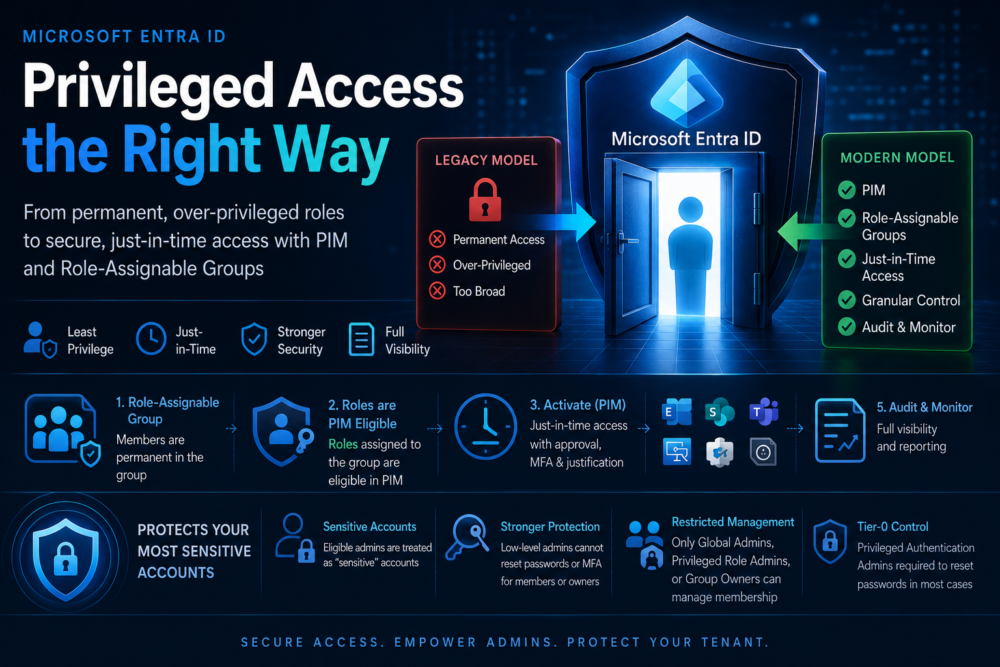
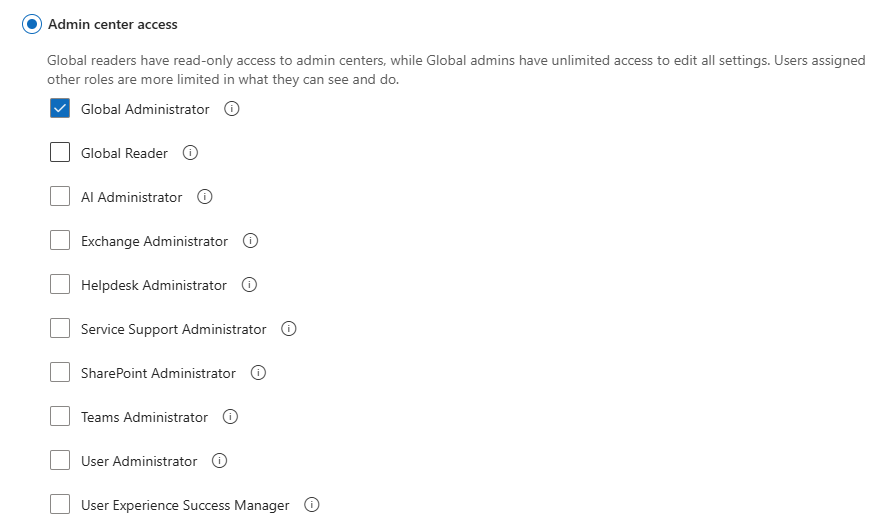
First, we just had Microsoft 365 Roles like Global Administrator, Exchange Administrator, SharePoint Administrator. It very quickly became apparent that these were not appropriate for an enterprise organisation, as they were permanent and were too broad in permission scope in some respects, particularly if you just need to grant things like Conditional Access Administrator or Intune Administrator.
Now, we have the Privileged Identity Management (PIM) model. For the initial deployment we could add users directly to an Entra Role and make them “Eligible” to promote/activate themselves to use that specific role. We could control how long the activation would last, if it required approval, a justification, additional MFA and who to notify on activation.
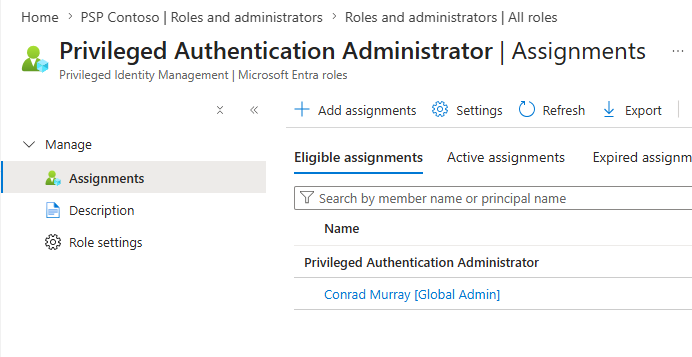
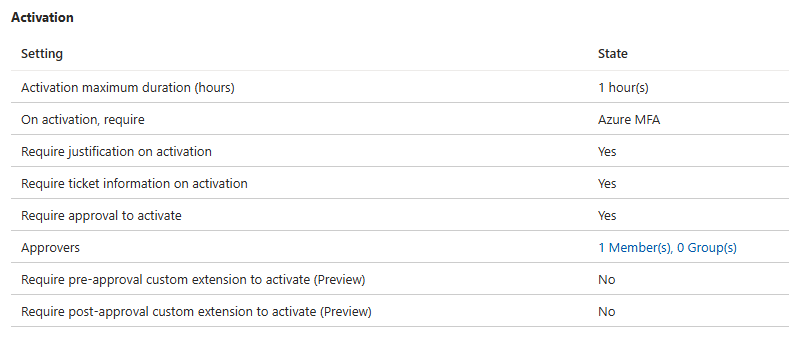
PIM is and was great, but it also meant that high tiered Admins could have many Admin Roles assigned to them and may need to PIM up multiple times a day to each role. Each Entra Role needs to be manually updated as Administrators join and leave. Too much overhead.
So, now we have Privileged Access Groups / Azure Role Assignable Groups.

I wrote a blog on those here: Privileged Access groups (Preview) – Nero Blanco
Role-assignable groups are special and protected Groups. The idea here was that you could put all the roles an administrator might need into the Group i.e. SharePoint, Teams, Exchange Administrator and the admins could PIM up to all three roles in one go by virtue of being “eligible” to PIM their membership into the Group.
This was good, but it did mean that when an administrator’s account was not PIM’d into the group, they were just like any other standard “nothing special” account. This means that any low-level admin could reset that account password and MFA methods and take it over, them PIM themselves into that group.
Definitely a security hole.
Roles eligible
Best practice is to now make the Role Group have the MEMBERS permanent but make the Roles eligible.
.
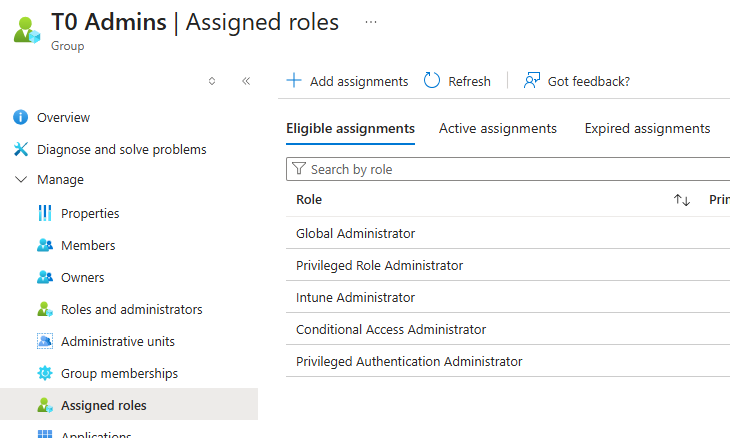
Now, when I go to PIM, I see the roles I can activate.
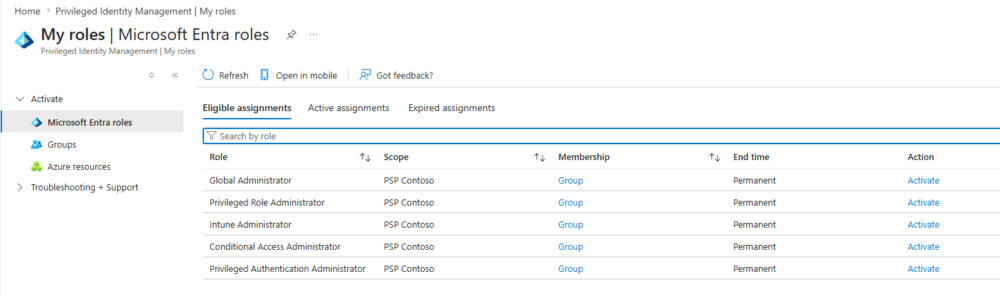
You must make all your PIM activation settings on the Entra role like duration, justification etc, rather than on the Group PIM settings.
But it is still just a group right? So any Group Admin can add themselves?
There can be a concern that a low-level Groups Admin could just put themselves into a privileged group and backdoor themselves in as an admin. Not true. Microsoft’s troubleshooting docs specifically say that if you are a Groups Administrator, you cannot see the “Microsoft Entra roles can be assigned to the group” switch; Privileged Role Administrators can create a group eligible for role assignment.
Key takeaway: A normal Groups Administrator can NOT manage membership or create new role-assignable groups just because they are Groups Administrator. Role-assignable groups are special and protected Groups.
Admin accounts
Because your Admin Entra Id accounts are “eligible” for activation to privileged roles, Entra now treats those accounts as special “sensitive” accounts, so basic low level User Admins/Password Admins cannot reset the passwords and basic Authentication Administrator cannot reset the Authentication methods.
Microsoft’s permissions reference says Authentication Administrators cannot change credentials or reset MFA for members and owners of a role-assignable group. Microsoft’s role reset matrix also calls out this exact category: a user with no admin role but who is a member or owner of a role-assignable group can only have their password reset by Privileged Authentication Administrator or Global Administrator. That means role-assignable groups give you an extra protection boundary. This is one of the reasons they matter.
For PIM for Groups, Microsoft states that for role-assignable groups, only Global Administrator, Privileged Role Administrator, or the group Owner can manage the group. It also says no other users can modify the credentials of members and owners of role-assignable groups.
The security boundary is not “is the user Groups Administrator?” The security boundary is “who can manage role-assignable group membership, ownership, and role assignments?”
Microsoft’s model for role-assignable groups is deliberately more restricted than normal security groups. By default, Privileged Role Administrators can manage membership of role-assignable groups, and membership management can also be delegated by adding group owners. Microsoft also notes that Graph needs RoleManagement.ReadWrite.Directory to manage membership of role-assignable groups; normal Group.ReadWrite.All is not enough.
The risky people are:
- Global Administrators
- Privileged Role Administrators
- Owners of the role-assignable group
- Any app/service principal with RoleManagement.ReadWrite.Directory
- Anyone who can manage PIM eligibility/activation for that group or role
A user who is eligible for Global Administrator through a group may not currently be “active Global Admin”, but they may still be treated as a sensitive target depending on how that eligibility is represented. The dangerous case is where a lower-privileged admin can reset the password or authentication methods of someone who is only eligible to activate privileged access.
Notes on Privileged Authentication Administrator
A Privileged Authentication Administrator is intentionally powerful. Microsoft describes it as being able to view, set, and reset authentication method information for any user, admin or non-admin. So yes: a hostile or compromised Privileged Authentication Administrator is a serious risk to privileged accounts. That role should be treated as near-tier-0 / highly privileged.
Recommended control set
For Global Administrator / Privileged Role Administrator / Conditional Access Administrator groups, I’d use:
| Control | Recommendation |
| Group type | Role-assignable security group |
| Group owners | None if possible, otherwise tightly controlled |
| Member management | Only Global Admin / Privileged Role Admin / controlled process |
| Role assignment | Eligible, not active, where operationally possible |
| Activation | Approval required |
| MFA at activation | Phishing-resistant MFA |
| Password/MFA reset protection | Do not let lower admin roles reset these accounts |
| Monitoring | Alert on membership, ownership, activation, password reset, MFA method changes |
| Access reviews | Regular review of members, owners, eligible assignments and activations |
Microsoft privileged roles
A reminder on Microsoft Privileged Roles. These roles should be on your Conditional Access policies and require phishing-resistant MFA and absolutely should always require PIM to activate and only for the correct users for the job role and only for the least amount of time that they need to do that job.
| Role | Description |
| Agent ID Administrator | Manage all aspects of agents in a tenant including identity lifecycle operations for agent blueprints, agent service principals, agent identities, and agentic users. |
| AI Administrator | Manage all aspects of Microsoft 365 Copilot and AI-related enterprise services in Microsoft 365. |
| AI Reader | Read all aspects of Microsoft 365 Copilot and AI-related enterprise services in Microsoft 365. |
| Application Administrator | Can create and manage all aspects of app registrations and enterprise apps. |
| Application Developer | Can create application registrations independent of the ‘Users can register applications’ setting. |
| Attribute Provisioning Administrator | Read and edit the provisioning configuration of all active custom security attributes for an application. |
| Attribute Provisioning Reader | Read the provisioning configuration of all active custom security attributes for an application. |
| Authentication Administrator | Can access to view, set and reset authentication method information for any non-admin user. |
| Authentication Extensibility Administrator | Customize sign in and sign up experiences for users by creating and managing custom authentication extensions. |
| Authentication Extensibility Password Administrator | Trigger a password submit event for custom authentication. |
| B2C IEF Keyset Administrator | Can manage secrets for federation and encryption in the Identity Experience Framework (IEF). |
| Cloud Application Administrator | Can create and manage all aspects of app registrations and enterprise apps except App Proxy. |
| Cloud Device Administrator | Limited access to manage devices in Microsoft Entra ID. |
| Conditional Access Administrator | Can manage Conditional Access capabilities. |
| Directory Writers | Can read and write basic directory information. For granting access to applications, not intended for users. |
| Domain Name Administrator | Can manage domain names in cloud and on-premises. |
| External Identity Provider Administrator | Can configure identity providers for use in direct federation. |
| Global Administrator | Can manage all aspects of Microsoft Entra ID and Microsoft services that use Microsoft Entra identities. |
| Global Reader | Can read everything that a Global Administrator can, but not update anything. |
| Helpdesk Administrator | Can reset passwords for non-administrators and Helpdesk Administrators. |
| Hybrid Identity Administrator | Can manage AD to Microsoft Entra cloud provisioning, Microsoft Entra Connect, and federation settings. |
| Identity Governance Administrator | Manage access using Microsoft Entra ID Governance scenarios. |
| Intune Administrator | Can manage all aspects of the Intune product. |
| Lifecycle Workflows Administrator | Create and manage all aspects of workflows and tasks associated with Lifecycle Workflows in Microsoft Entra ID. |
| Password Administrator | Can reset passwords for non-administrators and Password Administrators. |
| Privileged Authentication Administrator | Can access to view, set and reset authentication method information for any user, admin or non-admin. |
| Privileged Role Administrator | Can manage role assignments in Microsoft Entra ID, and all aspects of Privileged Identity Management. |
| Security Administrator | Can read security information and reports, and manage configuration in Microsoft Entra ID and Office 365. |
| Security Operator | Creates and manages security events. |
| Security Reader | Can read security information and reports in Microsoft Entra ID and Microsoft 365. |
| User Administrator | Can manage all aspects of users and groups, including resetting passwords for limited admins. |