Entra App Registrations, Enterprise Apps and Service Principals
A practical engineering guide to owners, assignment, consent, credentials and risk
| The one-line lesson: do not confuse ownership, assignment, consent and credentials. They control different risks. |
Contents
- Why this topic trips people up
- The core objects: App Registration, Enterprise Application and Service Principal
- Consent and permissions: where the blast radius lives
- Delegated permissions vs application permissions
- Assignment required: useful, but often misunderstood
- Owners: accountability, administration and privilege
- Credentials, certificates and secrets
- App instance property lock
- A practical review framework
- Engineering checklist and references
Why this topic trips people up
Microsoft Entra application governance looks simple until you start reviewing real tenants. Then the terminology gets slippery. App Registrations, Enterprise Applications, service principals, owners, assignments, consent, permissions, app roles, user roles, secrets and certificates all appear in related admin screens, but they do not mean the same thing and they do not control the same risk.
That confusion matters. It is common to see teams treat an ownerless app as an access problem, or treat assignment required as if it reduces Microsoft Graph permissions. It is also common to see business users added as owners of privileged app registrations because “every app needs an owner”.
The intention is good, but the control is wrong.
| Key takeaway: The goal is not to memorise every Entra object type. The goal is to understand which setting controls accountability, which controls access, which controls authentication, and which controls data or control-plane blast radius. |
This article is written as a practical crib sheet for Microsoft 365 and Entra engineers. It deliberately focuses on review and governance decisions rather than product marketing terminology.
The core objects
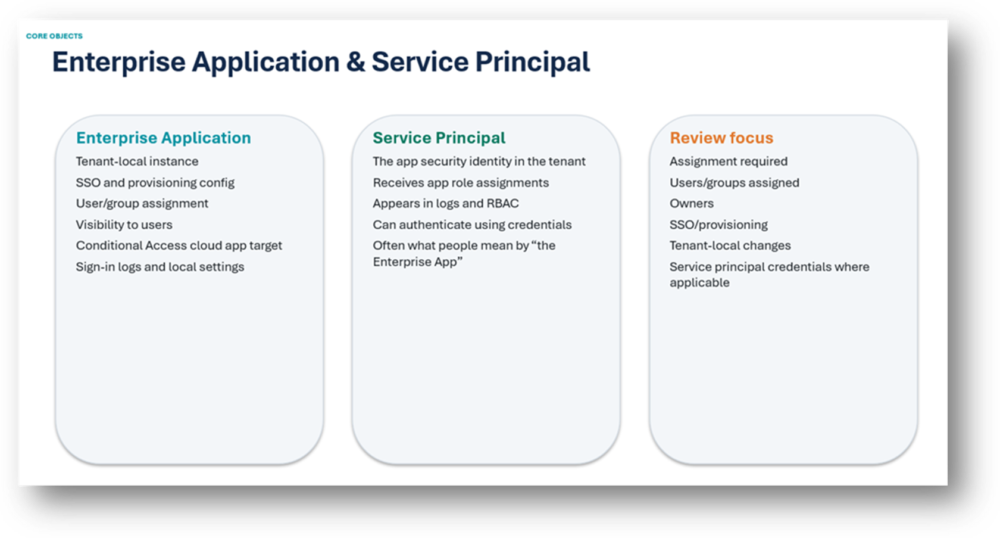
The cleanest way to start is to separate the three objects that engineers most often blur together: the application object, the service principal, and the Enterprise Application experience in the portal.
| Concept | Plain English | Where you usually see it | Main review question |
| App Registration / application object | The home definition or blueprint for the app. | Entra admin center > App registrations | What is this app, how does it authenticate, and what permissions does it request? |
| Service principal | The app identity in a tenant. | Graph/API object; represented in the portal by Enterprise Applications | What identity receives permissions and signs in? |
| Enterprise Application | The tenant-local instance of an app. | Entra admin center > Enterprise applications | How is this app configured, assigned and governed in this tenant? |
Microsoft describes the relationship as application objects and service principal objects. A single application object can have service principal instances in tenants where the application is used. For engineers, the simplest mental model is this: App Registration equals the definition; Enterprise Application/service principal equals the local instance and identity in a tenant.
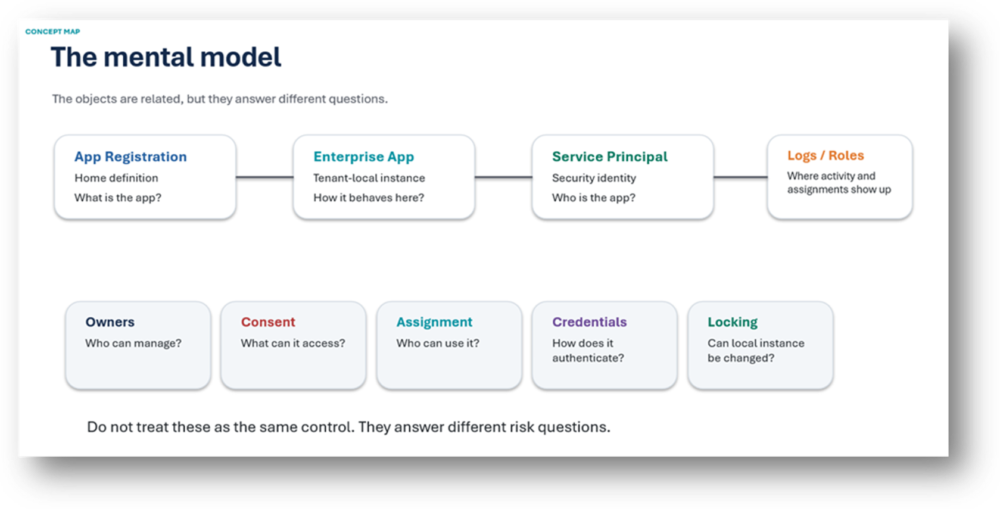
A simple relationship diagram
| Blueprint | Tenant-local identity | Tenant configuration |
| App Registration Application object Client ID, redirect URIs, credentials, requested API permissions | Service Principal The application identity in the tenant Receives app role assignments, consent grants and sign-in activity | Enterprise Application Portal view for the service principal Assignment, SSO, provisioning, visibility and app-specific settings |
Consent and permissions: where the blast radius lives
Consent is where the real blast radius often lives. If an application has powerful Microsoft Graph application permissions, the risk is not just that someone can click a tile in My Apps. The risk may be that the application identity can read or modify large parts of the tenant without a user being present.
Permission review should answer practical questions:
- Who approved this permission?
- Why does the app need it?
- Is the permission delegated or application?
- Is admin consent granted?
- Is the permission still required?
- What data, directory objects, mailboxes, SharePoint sites or control-plane operations can the app access?
| Risk pattern | Why it matters |
| Broad directory permissions | Can expose or manipulate users, groups, devices, applications or role-related data. |
| Mail, files or sites permissions | Can create large data-exposure risk, especially with application permissions. |
| Application.ReadWrite.All or AppRoleAssignment.ReadWrite.All | Can create an application governance control-plane risk. |
| RoleManagement.ReadWrite.Directory | Can create privileged role management risk. |
| Admin consent granted with no clear owner | Broad tenant access exists but accountability is unclear. |
| Key takeaway: Assignment required can restrict who is allowed to use an Enterprise Application, but it does not reduce API permissions already granted to the application. |
Delegated permissions vs Application permissions
This distinction deserves its own section because it is one of the most important concepts in application risk review.
| Permission type | How it works | Risk question |
| Delegated permissions | The app acts on behalf of a signed-in user. The app and the user both need to be authorised for the action. | What could this app do as the signed-in user, and which users can sign in? |
| Application permissions | The app acts as itself, without a signed-in user. The application identity can call APIs directly according to the permissions granted. | What can this app do across the tenant even when no user is present? |
Delegated permissions are not automatically safe
A delegated permission granted tenant-wide can still be risky if many users can sign in and the application can operate on behalf of those users. But the user context still matters: the user must normally have access to the target resource or action as well.
Application permissions
Application permissions are often the bigger governance concern because the application runs as its own identity. For background services, migration tools, automation jobs and reporting agents this is often necessary. It is also why ownership, credential hygiene and permission review are so important.
| Example | Delegated interpretation | Application interpretation |
| Mail.Read | The app can read mail as the signed-in user, subject to user access and consent. | The app may be able to read mailboxes without a signed-in user, depending on scope and API behaviour. |
| Sites.Read.All | The app can read sites on behalf of signed-in users where allowed. | The app can potentially read SharePoint site content broadly as itself. |
| Directory.Read.All | The app can read directory data on behalf of users where authorised. | The app can read directory data as an application identity. |
| Key takeaway: When reviewing permissions, always ask: delegated or application? If it is application permission and admin consent is granted, treat it as a non-human identity with its own blast radius. |
Assignment required: useful, but often misunderstood
Assignment required is an Enterprise Application setting. It controls whether users, groups, apps or services must be explicitly assigned before tokens are issued to that Enterprise Application. It is an access control setting.
It does not control who owns the application. It does not rotate credentials. It does not remove consent. It does not reduce Microsoft Graph permissions. It does not turn a high-risk application into a low-risk application.
| Assignment required does | Assignment required does not |
| Require explicit user/group/app assignment before access is allowed. | Change API permissions or consent. |
| Help reduce casual or unintended access to the application. | Control who can edit the app registration or Enterprise Application. |
| Support clearer access governance for SaaS and line-of-business apps. | Fix ownerless applications or credential hygiene. |
A good engineering question is therefore not simply “is assignment required enabled?” It is “does this app need open access, and if it does not, are the assignments deliberate, reviewed and appropriate?”
Owners: accountability, administration and privilege
Ownerless applications are a real governance problem, but the remediation is not always to add any available business user as an owner. Adding an owner can grant meaningful administrative control. For App Registrations, ownership can allow management of sensitive application configuration.
For Enterprise Applications, owners may be able to manage app-specific configuration such as SSO, provisioning and user assignment.
| Key takeaway: No owner is bad. The wrong owner can be worse. |
| Owner model | Purpose |
| Business Owner | Accountable for why the app exists, who needs it and whether it still has a business purpose. |
| Technical Owner | Responsible for configuration, support, credential rotation and break/fix. |
| Privileged Admin Group | Allowed to make sensitive changes to app registrations, service principals, credentials and consent-related configuration. |
For low-risk SaaS Enterprise Applications, a business owner may be appropriate. For app registrations with Graph application permissions, secrets, certificates or automation access, ownership should be treated as privileged. A business owner can be recorded in an assessment tool or CMDB without necessarily being granted direct Entra owner permissions over a high-risk application object.
Credentials, certificates and secrets
Credentials are impersonation risk. If an app has a client secret or certificate, anyone who obtains that credential may be able to authenticate as the application. The risk is particularly high when the same application also has broad application permissions and admin consent.
| Review item | Why it matters |
| Client secrets | Often easier to leak, sometimes long-lived, and frequently forgotten after deployment. |
| Certificates | Better than secrets in many designs, but still powerful and need expiry/rotation governance. |
| Expired credentials | May indicate abandoned apps or poor lifecycle management. |
| Multiple active credentials | May indicate undocumented integrations or failed rotation cleanup. |
| No owner plus active credential | No clear accountability for an identity that can authenticate. |
The especially dangerous combination is:
| High-risk pattern: No owner + high permissions + active secret or certificate. |
App instance property lock
App instance property lock is related to the servicePrincipalLockConfiguration property. In simple terms, it is designed to stop sensitive service principal instance properties being changed, especially for multi-tenant applications where the publisher wants to protect properties on service principal instances created in consuming tenants.
| Use it when | Do not treat it as |
| You publish or own a multi-tenant SaaS app. | A fix for ownerless applications. |
| Customer tenants consent to your app. | A replacement for ownership, permission review or credential rotation. |
| You do not want local tenant admins adding credentials to the service principal instance. | A general-purpose app governance model. |
| Token signing, verification or encryption properties must remain controlled by the publisher. | A substitute for Privileged Identity Management or admin RBAC. |
This is a useful control, but it solves a specific problem. If an app registration in your own tenant has no owner, app instance property lock does not create accountability. You still need someone or some controlled team responsible for why the app exists, who approved the permissions, who rotates credentials and who approves retirement.
A practical review framework
When reviewing Entra applications, avoid starting with a giant export and trying to read every property. Start with risk patterns and then drill into the objects that matter.
| Finding | What it usually means | Review action |
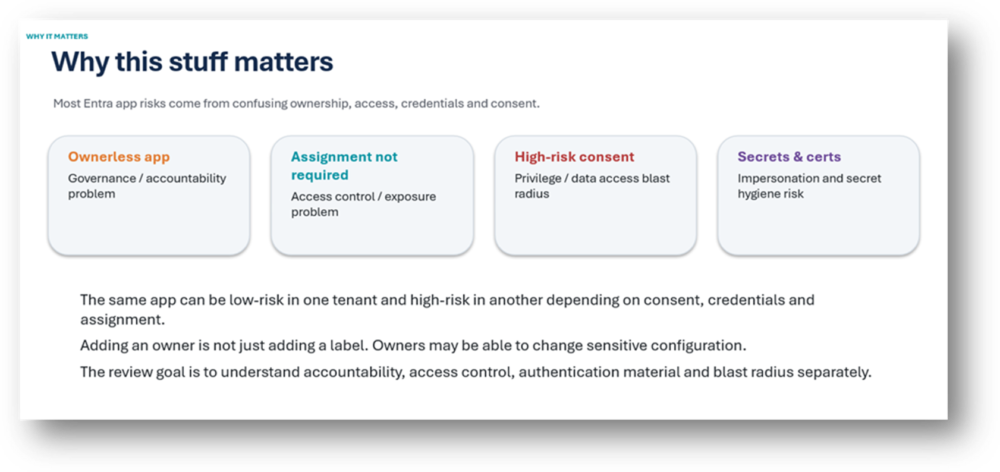
| Ownerless app | Governance/accountability problem. | Identify business and technical owner. Do not blindly assign ordinary users to privileged apps. |
| Assignment not required | Potential access/exposure problem. | Confirm whether open access is intentional. Review sign-ins and user population. |
| High-risk permissions | Privilege or data access risk. | Validate business need, admin consent, and whether application permission is required. |
| Active credentials | Impersonation/secret hygiene risk. | Check expiry, rotation process, storage location and whether credentials are still used. |
| Multi-tenant app | External dependency and consent risk. | Review publisher, verified status, consent, permissions and sign-in usage. |
| Ordinary user as owner of privileged app | Potential over-delegation of sensitive admin control. | Move technical control to an appropriate admin group or platform team. |
A quick risk tiering model
| Tier | Pattern |
| Low concern | Clear owner, low permissions, no broad consent, short-lived or no credentials, used recently, clear business purpose. |
| Review | No owner, assignment not required, old credentials, unclear purpose, no recent sign-in activity, or broad delegated permissions. |
| High risk | No owner, high-risk application permissions, active long-lived secret/certificate, admin consent granted, unclear business purpose. |
| Very high risk | Powerful control-plane permissions such as: Application.ReadWrite.All, RoleManagement.ReadWrite.Directory, AppRoleAssignment.ReadWrite.All or Sites.FullControl.All combined with no owner and active credentials. |
Engineering checklist
| Question | Why it matters |
| Is there an owner? | Accountability. |
| Is the owner appropriate? | Avoid over-delegation of sensitive configuration. |
| Is assignment required? | Access control and exposure. |
| Who is assigned? | User/group exposure and lifecycle. |
| What permissions are consented? | Data and control-plane blast radius. |
| Are permissions delegated or application? | User-context risk versus app-context risk. |
| Does it have secrets or certificates? | Impersonation risk. |
| When do credentials expire? | Secret hygiene and rotation. |
| Is it multi-tenant? | External publisher and consent dependency. |
| Is it still used? | Lifecycle cleanup. |
| Does it appear in sign-in logs? | Usage validation. |
| Is App instance property lock relevant? | Publisher control for multi-tenant app instances. |
The one-slide version
| Term | Remember it like this |
| App Registration | The app definition. |
| Enterprise Application | The tenant-local app instance. |
| Service Principal | The app identity in the tenant. |
| Consent | What the app can access. |
| Assignment | Who can use the app. |
| Owners | Who can manage or govern the app. |
| Credentials | How the app authenticates. |
| Permissions | How big the blast radius is. |
| Final takeaway: Do not confuse ownership, assignment, credentials and consent. They are related, but they control different risks. |
References
- Microsoft Learn: Application and service principal objects in Microsoft Entra ID
- Microsoft Learn: Permissions and consent in the Microsoft identity platform
- Microsoft Learn: Review permissions granted to enterprise applications
- Microsoft Learn: Grant tenant-wide admin consent to an application
- Microsoft Learn: Assign users and groups to an application
- Microsoft Graph: Permissions overview